Standby Phase
Ready your Duel Disk
The Battle City Launcher takes your copy of Yu-Gi-Oh! ONLINE to the Battle City server. It never changes your game folder.
Equip only to "Yu-Gi-Oh! ONLINE Ver.060110.00". The equipped game connects to the Battle City server, gains a picture for every card, and may be played full screen.
Equip Spell · Windows
Battle City Launcher
Download for WindowsReleased recently · All releases & SHA-256 checksum · Source code
Summoning requirements
-
Windows 10 or 11, 64-bit The launcher is a single program with nothing to install.
-
Yu-Gi-Oh! ONLINE Ver.060110.00 The February 2006 client, unpacked anywhere. The server turns every other version away, and the game shows its version error.
-
An email address For the code that confirms your account, and for resetting your password.
Bring your own copy. No game files are distributed by this project. The February 2006
client comes as a game folder rather than an installer, archived as Yu-Gi-Oh! ONLINE 2006-02_Extracted.7z.
Build the chain
From download to duel
Five links, resolved in order. Then it’s your move.
-
Unpack the game
Put the Yu-Gi-Oh! ONLINE Ver.060110.00 folder anywhere you like, for example in
Documents. There is no installer to run. -
Run the launcher
Start
BattleCityLauncher.exe. If Windows says it doesn’t recognise the app, click More info, then Run anyway. -
Choose your game folder
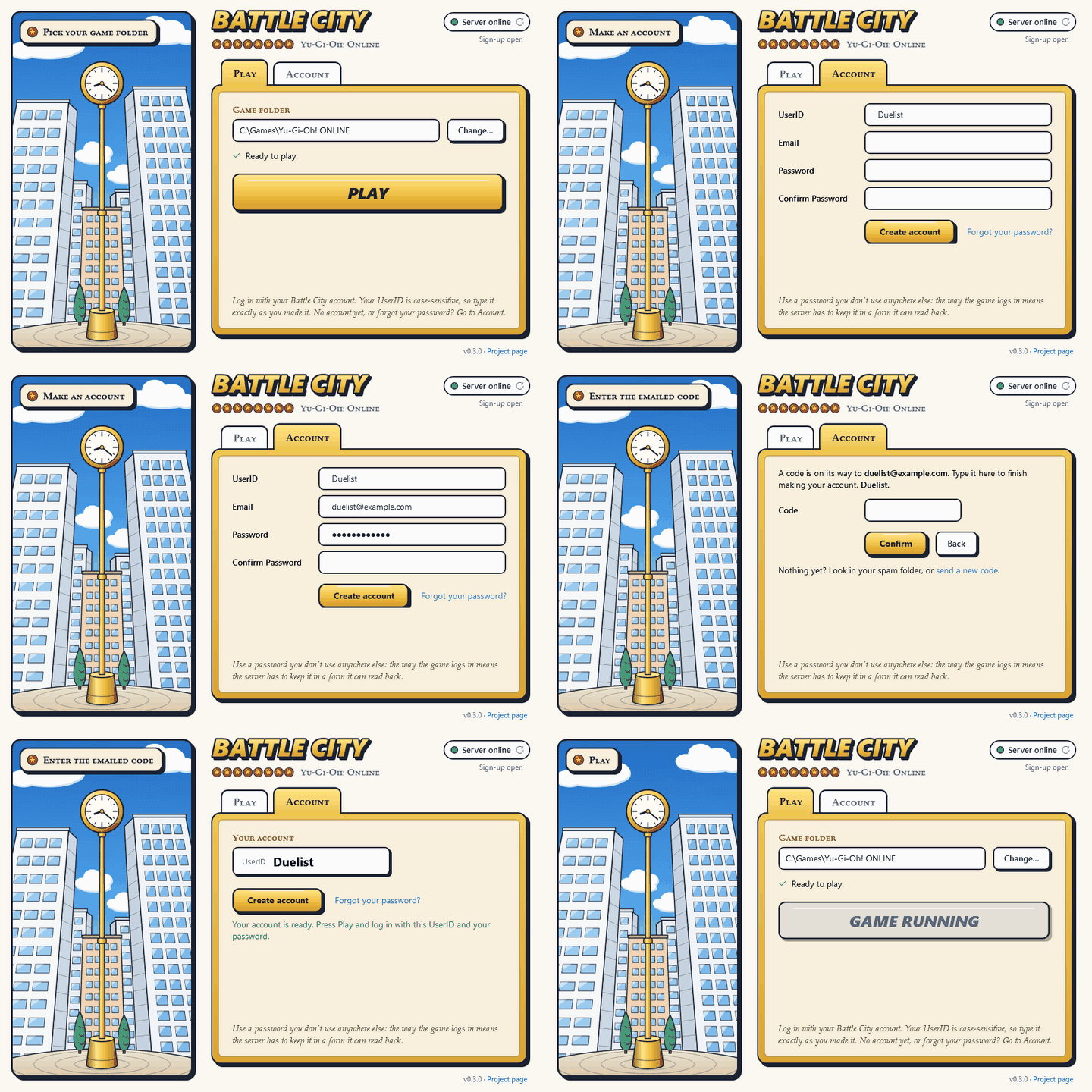
Click Change… and pick the folder you unpacked.
-
Register as a duelist
Sign up on this site or under Account in the launcher, and enter the code we email you.
-
Press Play
Log in with your UserID and password. On your first lobby visit choose Yugi’s, Kaiba’s or Joey’s starter deck, then build your deck in Deck Construction.
Judge’s rulings
Tips & troubleshooting
The game won’t accept my UserID or password
Your UserID is case-sensitive: Duelist must be typed as Duelist.
UserIDs and passwords are letters and digits only, because the game’s login screen drops every other
character. If you have forgotten your password, set a new one.
The game says my version is wrong
The server only accepts the February 2006 client, Ver.060110.00. Older clients, such as the June 2005 one the Phase 1 disc installs, are turned away. Point the launcher at a Ver.060110.00 folder instead.
How do I play in a bigger window?
The game runs in its own small window. Under Settings, pick a size or Full screen for Resolution. Sizes with a star are the sharpest, and full screen uses your main monitor.
Some cards show a placeholder picture
About a thousand cards in the client have no picture of their own. The launcher fetches pictures for them from the server when you press Play, so the first start can take a moment. On a slow connection the game won’t wait for all of them: the rest arrive the next time you play.
My deck is empty after choosing a starter deck
That’s expected. The game builds a new character’s first deck before you pick your starter, so it starts out empty. Open Deck Construction and build a deck of at least 40 cards from your new cards before your first duel.
The launcher says it is out of date
The server can retire old launchers. Download the latest version from this page and run it instead; your settings are kept.
Can I play without the launcher?
Advanced users can patch the client by hand with tools/patch_client.py from the
server repository,
using --gate-host battle-city.net, and launch online_pc.dat directly. The launcher is
the supported way to play, and the only one that installs the missing card pictures.
Still stuck?
Ask in the Tech Support board of the forum. Someone will help you get dueling.
Building the launcher yourself
With the .NET 10 SDK on Windows:
dotnet publish src/BattleCity.Launcher -c Release -o publishThe first build downloads cnc-ddraw, which the launcher carries for larger screens, and checks it against a pinned hash. The launcher is released under GPL-3.0; cnc-ddraw is under the MIT License.